
Dify Configuration
Dify is an open-source platform for developing large-scale model applications. You can configure to access the models of the Token Switch platform.
Prerequisites
Before starting, it is recommended to confirm the following conditions:
| Configuration item | Explanation |
|---|---|
| API Provider | Optional OpenAI Compatible。 |
| Base URL | |
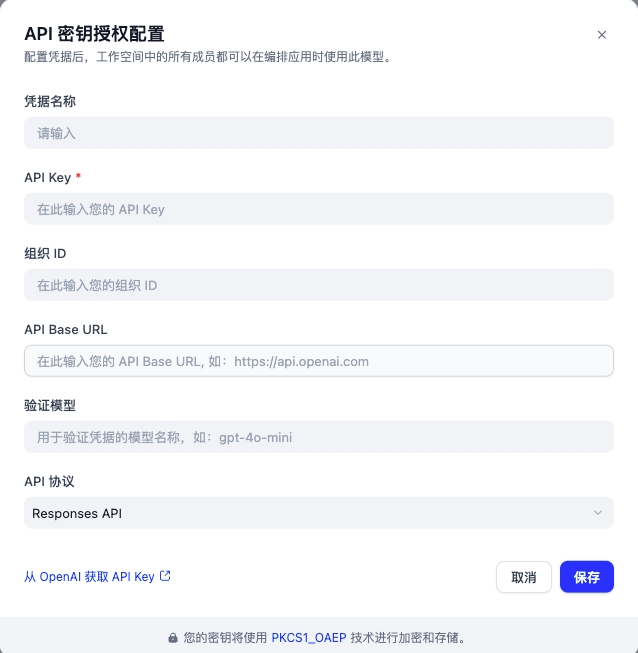
| API Key | Enter the created API Key. |
| Model ID | Enter the model ID. You can click on the model card in the "Portal / Model Square" to copy it. |
1. Configuration model
1.1 Installation model supplier
http
Select a custom model supplier1.2 Configuration API Key
2. Start using
Dify offers various types of large model applications. Please select the type you are using for reference.
- Chatbot/Agent
http
1. Create a chat assistant or agent

In the studio, click "Create Blank Application", then create a chat assistant or Agent in the "Beginner Mode" and proceed.

2. Select the model

On the right upper corner of the application page, you can select the model. For example, using the gpt-5.4 model from OpenAI, turn on the thinking mode and set it to True.

3. Dialogue Test

If you input "Who are you?", the model will respond after thinking.- Chatflow/Workflow
http
1. Create a Chatflow or workflow

Create a Chatflow or workflow in the studio and then enter it.

2. Add LLM node

Add an LLM node to the canvas, select the node and enter the editing interface. Choose the model you want to use. Here, select gpt-5.4, switch to the thinking mode and set it to True.


3. Run the LLM node

Click "Add Message", enter the question "Who are you" under the corresponding message of USER, and click the run button at the top right corner of the node on.

After the operation is completed, in the "text" field of the output result, the reflection content is marked by `<think>...</think>` The label wrapper, followed by the model's reply text.

The "text" field returned by the LLM node contains the thoughts and responses. You can use the code execution node of Dify to extract them separately using regular expressions.- Knowledge base
http
1. Create a knowledge base

Create a knowledge base and log in.

2. Select data source

In this step, upload your knowledge base file.

3. Text Segmentation and Cleaning

At this step, you can configure the Embedding model and Rerank model provided by the Token Switch platform.